Introduction
In today’s fast-moving business world, managing inventory efficiently is more important than ever. Traditional inventory methods like manual counting, barcode scanning, and spreadsheets are often slow, error-prone, and lack real-time visibility.
This is where Computer Vision comes in.
Computer vision is a branch of Artificial Intelligence (AI) that allows machines to “see” and understand images and videos. In inventory management, it uses cameras and smart algorithms to automatically monitor stock levels, track product movement, and detect errors in real time.
Businesses like Amazon and Walmart are already using this technology to improve efficiency, reduce costs, and avoid stockouts.
What is Computer Vision in Inventory Management?
Computer vision in inventory systems refers to using AI-powered cameras and image recognition software to:
Track inventory automatically
-
Computer vision systems use cameras and AI to continuously observe inventory without human involvement. Every product movement—whether added, removed, or relocated—is automatically recorded and updated in the system, ensuring accurate and real-time tracking.
Count products without manual effort
-
Instead of physically counting items, the system analyzes images or video feeds to identify and count products instantly. This eliminates time-consuming manual stocktaking and reduces the chances of counting errors.
Detect missing or misplaced items
-
The system can quickly identify when products are not in their expected location or are missing from shelves or storage areas. It compares real-time visuals with stored data and alerts managers to take immediate action.
Monitor stock levels continuously
-
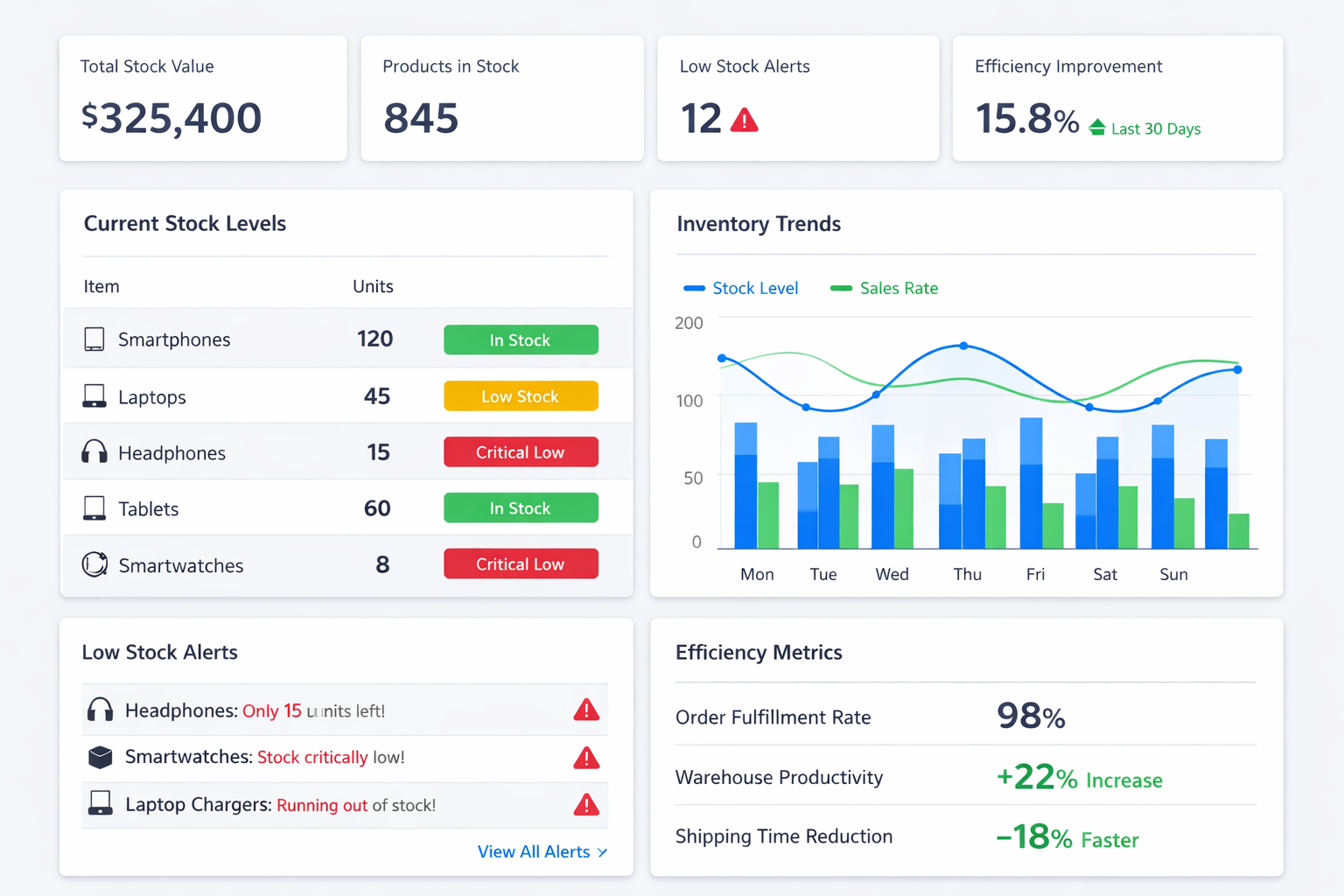
Inventory levels are monitored 24/7, providing live updates on stock availability. Businesses receive automatic alerts when stock is low or needs replenishment, helping prevent stockouts and overstocking.
Unlike traditional systems that rely on periodic checks, computer vision provides 24/7 real-time monitoring.
How Computer Vision Works in Inventory Systems
The working process is simple and effective:
1. Data Capture
Cameras and sensors capture images or video of shelves, warehouses, or storage areas.
2. Image Processing
AI models analyze images using techniques like:
-
Object Detection
Object detection is used to identify and locate different items within an image or video. In inventory management, it helps the system recognize specific products on shelves or in warehouses and track their position and movement accurately. -
Image Classification
Image classification involves categorizing an entire image into a specific class or label. For example, the system can identify whether an image contains electronics, groceries, or clothing, helping in organizing and managing inventory efficiently. -
OCR (Optical Character Recognition)
OCR technology is used to extract text from images, such as product labels, barcodes, or serial numbers. This allows the system to read and record important information automatically without manual data entry.
3. Product Identification
The system identifies products, reads labels, and matches them with inventory data.
4. Real-Time Updates
Stock levels are updated automatically in the system.
5. Alerts & Insights
Notifications are triggered when:
-
Stock is low
The system continuously monitors inventory levels and automatically detects when the quantity of a product falls below a predefined threshold. It then sends alerts or notifications, helping businesses restock items on time and avoid stock shortages. -
Items are misplaced
Computer vision compares the actual placement of products with their expected location. If an item is found in the wrong place, the system flags it, making it easier to maintain proper organization and quickly locate products. -
Errors are detected
The system identifies inconsistencies such as incorrect product counts, wrong labeling, or mismatched inventory data. These errors are reported instantly, allowing businesses to take corrective action and maintain accurate records.
Key Benefits of Computer Vision in Inventory Management
1. Real-Time Inventory Tracking
Monitor stock continuously instead of periodic checks.
2. Improved Accuracy
Reduces human errors in counting and tracking inventory.
3. Reduced Labor Costs
Automates repetitive tasks like stock counting.
4. Faster Operations
Inventory counting can be significantly faster with computer vision.
5. Better Demand Forecasting
Helps predict stock requirements and avoid overstocking.
6. Loss Prevention
Detects missing or misplaced items quickly.
Real-World Use Cases
Retail Stores
-
Shelf monitoring
Computer vision systems continuously observe store shelves using cameras to ensure products are properly arranged and fully stocked. This helps maintain organized displays and ensures that products are always visible and accessible to customers. -
Detect out-of-stock items
The system automatically identifies empty spaces on shelves where products are missing. It sends real-time alerts to staff, allowing them to quickly restock items and avoid lost sales due to unavailability. - Improve customer experience
By keeping shelves well-stocked and organized, customers can easily find the products they need. This leads to faster shopping, higher satisfaction, and a better overall in-store experience.
Warehouses
-
Automated stock counting
Computer vision systems automatically count inventory using cameras and AI algorithms. This removes the need for manual counting, saves time, and ensures more accurate stock records. -
Track goods movement
The system monitors how products move within the warehouse or store, including incoming and outgoing items. This helps businesses maintain clear visibility of inventory flow and improves overall supply chain management. - Reduce manual audits
With continuous monitoring and automatic data updates, the need for frequent manual inventory audits is significantly reduced. This not only saves labor costs but also allows staff to focus on more important tasks.
Supply Chain
-
Monitor inbound and outbound goods
Computer vision systems track all incoming and outgoing products in real time. This ensures that every item entering or leaving the warehouse is recorded accurately, improving transparency and control over inventory flow. -
Cross-check shipments
The system automatically verifies shipments by comparing received or dispatched items with order details. This helps ensure that the correct products and quantities are delivered, reducing errors in logistics. -
Prevent stock discrepancies
By continuously monitoring inventory and comparing actual stock with recorded data, the system quickly identifies mismatches. This helps prevent issues like overstocking, understocking, or missing items, ensuring accurate inventory management.
Manufacturing
-
Ensure raw material availability
Computer vision systems continuously monitor raw material stock levels in real time. When materials start running low, the system automatically alerts the management, ensuring timely replenishment and uninterrupted production processes. -
Avoid production delays
By maintaining accurate and up-to-date inventory data, the system helps prevent shortages of essential materials. This ensures that manufacturing operations run smoothly without delays caused by missing or insufficient resources.
Key Components of a Computer Vision System
To implement computer vision in inventory management, businesses need:
High-resolution cameras
-
High-quality cameras are used to capture clear images and videos of inventory items. Better image quality helps the system accurately identify products, read labels, and detect changes in stock.
Machine learning algorithms
-
These algorithms process the captured images and learn to recognize different products, patterns, and movements. Over time, they improve accuracy in detecting, counting, and tracking inventory.
Cloud or local data storage
-
Inventory data is stored either on cloud platforms or local servers. This ensures that all information is safely saved, easily accessible, and can be updated in real time.
Integration with inventory software
-
Computer vision systems are connected with existing inventory management software. This allows automatic updates of stock levels and smooth data synchronization across systems.
Analytics tools for insights
-
Analytics tools process collected data to generate useful insights such as demand trends, stock patterns, and performance reports. These insights help businesses make better decisions and improve efficiency.
Challenges & Limitations
While powerful, computer vision also has some challenges:
High initial setup cost
-
Implementing computer vision requires investment in cameras, hardware, software, and infrastructure. This can be expensive at the beginning, especially for small businesses.
Need for training AI models
-
AI systems must be trained with large amounts of data to recognize products accurately. This process takes time, effort, and technical expertise to achieve good performance.
Integration with existing systems can be complex
Connecting computer vision technology with current inventory or ERP systems may require customization and technical adjustments, making the implementation process challenging.
Requires good lighting and camera positioning
-
The accuracy of computer vision depends heavily on clear visuals. Poor lighting or improper camera angles can affect detection and lead to errors.
Data privacy concerns
Using cameras and storing visual data raises concerns about privacy and data security. Businesses must ensure proper measures are in place to protect sensitive information.
Future of Computer Vision in Inventory Management
The future looks promising:
More affordable solutions for small businesses
-
As technology advances, the cost of implementing computer vision systems is decreasing. This makes it easier for small and medium-sized businesses to adopt these solutions without heavy investment.
Integration with IoT and robotics
-
Computer vision is increasingly being combined with Internet of Things (IoT) devices and robotics. This allows systems to not only monitor inventory but also automate tasks like restocking and material handling.
Smarter AI models with higher accuracy
-
Continuous improvements in AI and machine learning are leading to more accurate and reliable systems. These models can better recognize products, handle complex environments, and reduce errors significantly.
Fully automated warehouses
-
The future of inventory management includes warehouses that operate with minimal human intervention. Computer vision, along with automation technologies, will enable end-to-end automated processes from tracking to order fulfillment.
It is expected to significantly reduce inventory errors and improve operational efficiency across industries.
Frequently Asked Questions (FAQ)
Q1: What is computer vision in inventory management?
Ans: It is the use of AI-powered cameras and software to automatically track and manage inventory in real time.
Q2: How is it better than barcode systems?
Ans: Barcode systems require manual scanning, while computer vision provides continuous, automatic monitoring without human effort.
Q3: Is computer vision expensive to implement?
Ans: Initial costs can be high, but long-term savings from automation and accuracy make it cost-effective.
Q4: Can small businesses use computer vision?
Ans: Yes, modern solutions are becoming more affordable and accessible for businesses of all sizes.
Q5: What industries use computer vision for inventory?
Ans: Retail, manufacturing, logistics, eCommerce, and warehousing industries widely use it.
Conclusion
Computer vision is transforming inventory management by making it smarter, faster, and more accurate. It eliminates manual errors, provides real-time insights, and helps businesses make better decisions.
As technology continues to evolve, computer vision will become a standard part of modern inventory systems. Companies that adopt it early will gain a strong competitive advantage through improved efficiency, reduced costs, and better customer satisfaction.
In simple terms, computer vision turns inventory management from manual work into an intelligent automated system.



Shreyans Padmani
Shreyans Padmani has 5+ years of experience leading innovative software solutions, specializing in AI, LLMs, RAG, and strategic application development. He transforms emerging technologies into scalable, high-performance systems, combining strong technical expertise with business-focused execution to deliver impactful digital solutions.