Introduction
Artificial Intelligence is evolving rapidly—from simple chatbots to powerful systems that can actually do work for you. One of the most talked-about innovations in this space is OpenClaw, an open-source AI agent that is changing how developers and businesses use AI.
Unlike traditional AI tools that only respond to prompts, OpenClaw acts more like a digital employee. It can perform tasks, automate workflows, and even run continuously without constant human input. This shift—from “AI assistant” to “AI agent”—is why developers across the world are getting obsessed with it.
In this blog, you’ll learn what OpenClaw is, how it works, why it’s trending, its real-world use cases, and whether you should use it.
What Is OpenClaw?
OpenClaw is an open-source AI agent framework that connects large language models (like GPT or Claude) with real-world tools such as browsers, file systems, APIs, and messaging apps.
In simple words:
OpenClaw = AI that doesn’t just think, but also acts
It transforms AI from a chatbot into a system that can:
Execute Commands
-
OpenClaw can understand instructions and execute commands automatically. Whether it's running code, fetching data, or completing a task, it doesn’t just suggest solutions—it actually performs them.
Automate Tasks
-
With OpenClaw, you can automate repetitive and time-consuming tasks such as data entry, report generation, email replies, and more. This helps save time and improve productivity.
Interact with Apps
OpenClaw can connect and interact with different applications like browsers, messaging platforms, and APIs. It works seamlessly across tools to complete tasks efficiently.
Work Continuously
-
Unlike traditional AI, OpenClaw can work 24/7 in the background. It keeps running tasks, monitoring progress, and updating results—even when you're offline.
According to its creator, OpenClaw is “an AI that actually does things,” and by 2026, millions of such agents are already running globally.
From Chatbots to AI Agents
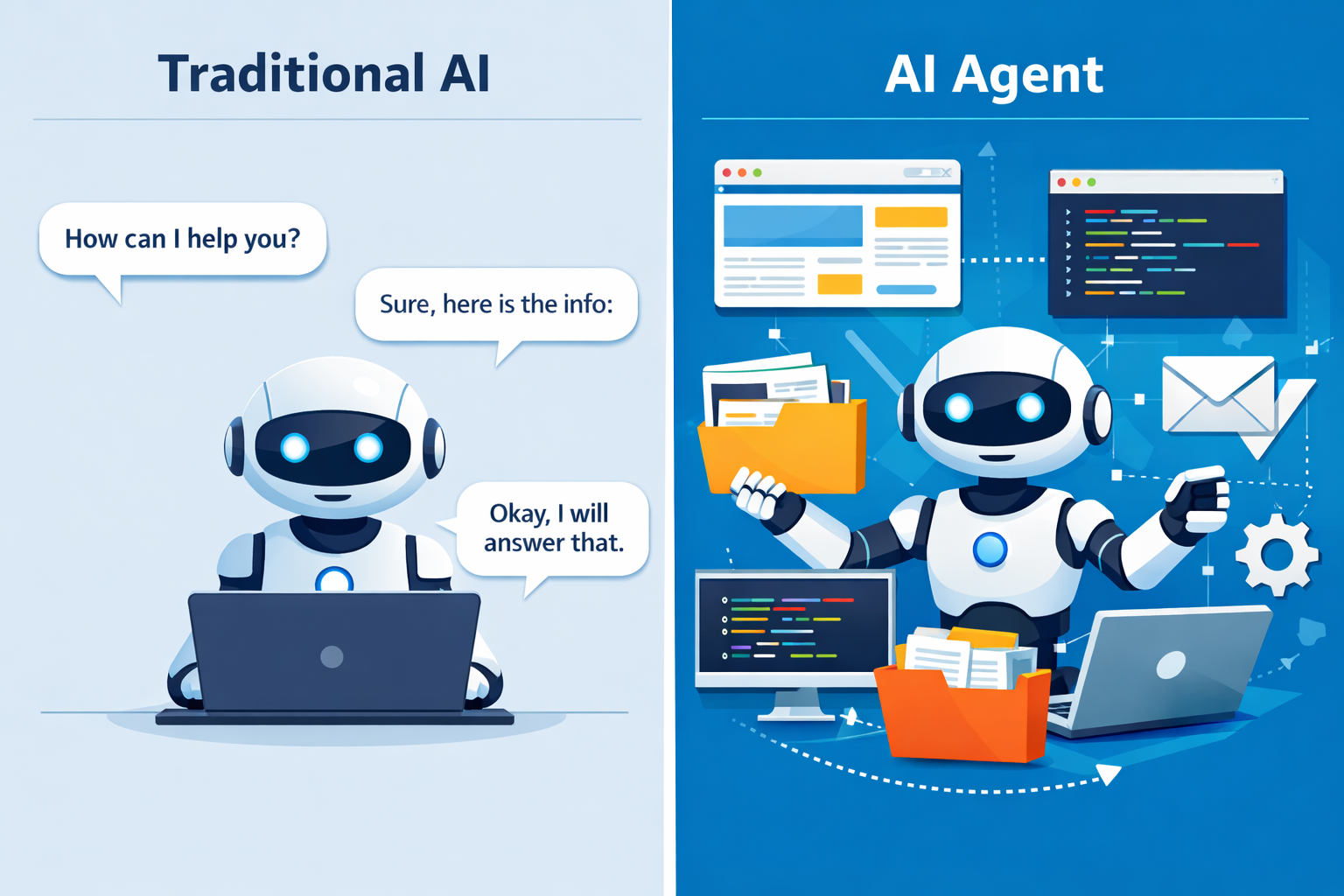
Traditional AI (like ChatGPT-style tools):
-
Answer Questions
-
Traditional AI can respond to user queries by providing information, explanations, or solutions. It works like a smart assistant that gives answers when asked.
-
Generate Content
-
It can create content such as articles, emails, code, and summaries. This makes it useful for writing and creative tasks.
-
Require User Prompts
-
Traditional AI depends on user prompts to function. It only works when you give instructions and does not take action on its own.
OpenClaw-style AI agents:
-
Perform Tasks Automatically
-
AI agents can complete tasks on their own without constant user input. Once you give instructions, they continue working until the task is finished.
-
Remember Past Interactions
-
They can store and recall previous conversations and data, allowing them to provide better, more personalized results over time.
-
Work in the Background
-
AI agents can run silently in the background, handling tasks even when you're not actively using them. This makes them ideal for long-running processes.
-
Handle Multi-Step Workflows
-
They can break complex tasks into multiple steps and execute them one by one. This allows them to solve problems that require planning and decision-making.
This shift is called Agentic AI—and OpenClaw is one of its biggest examples.
How OpenClaw Works (Simple Explanation)
OpenClaw works using something called an agent loop.
Step-by-step process:
You Give a Task
First, you assign a task to OpenClaw, such as “Create a report” or “Collect data from websites.”
AI Understands the Goal
The AI analyzes your request and understands what needs to be done, including the final outcome.
Uses Tools and Resources
OpenClaw then uses tools like browsers, files, and APIs to gather information and perform actions.
Executes Multiple Steps
It breaks the task into smaller steps and completes them one by one, ensuring accuracy and efficiency.
Delivers the Final Result
After completing all steps, OpenClaw provides the final output, such as a report, summary, or completed task.
It can repeat this cycle many times until the task is complete.
Key Features of OpenClaw
1. Persistent Memory
-
Stores Conversations and Data
-
OpenClaw can store past conversations, tasks, and important data, making it easier to continue work without starting from scratch.
-
Doesn’t Forget Context
-
Unlike traditional AI, it remembers context from previous interactions, so it understands ongoing tasks better and gives more accurate results.
-
Improves Over Time
-
As it gathers more data and experience, OpenClaw continuously improves its performance, becoming smarter and more efficient with each task.
2. Continuous Operation (Heartbeat)
-
Runs Tasks Automatically
-
Once you assign a task, OpenClaw can start and complete it on its own without repeated instructions.
-
Sends Regular Updates
-
It can provide updates every few minutes or hours, keeping you informed about the progress of your tasks.
-
Works Even When You’re Offline
OpenClaw continues to run in the background even when you are not active, ensuring your work keeps moving forward.
3. Tools & Skills
-
Browser Automation
-
OpenClaw can browse websites, collect information, and perform online tasks automatically, saving time on manual research.
-
File Handling
-
It can read, write, organize, and manage files, making it useful for handling documents, reports, and data.
-
Code Execution
-
OpenClaw can run code, debug errors, and assist in development tasks, helping developers work faster and more efficiently.
-
API Integrations
-
It can connect with external services through APIs, allowing it to interact with apps, databases, and online tools seamlessly.
4. Messaging Integration
Works with apps like:
-
WhatsApp
-
You can send commands and receive updates directly on WhatsApp, making it convenient for everyday use.
-
Slack
-
OpenClaw can integrate with Slack for team collaboration, helping automate tasks and manage workflows within your workspace.
-
Telegram
-
It allows you to control your AI agent through Telegram, giving quick access to tasks and notifications.
-
Discord
-
OpenClaw can also work with Discord, enabling automation and interaction within communities or teams.
You can control your AI agent just by messaging it.
Why Developers Are Obsessed With OpenClaw
1. It Turns AI into an “Employee”
Instead of asking AI repeatedly, developers can assign tasks and let it work independently.
2. Automation at a New Level
It can:
-
Research Topics
-
OpenClaw can search the internet, collect information, and summarize key insights, helping you save hours of manual research.
-
Write Code
-
It can generate code, fix bugs, and assist in development, making it useful for programmers and developers.
-
Manage Emails
-
OpenClaw can read emails, draft replies, and organize your inbox, reducing the need for manual email handling.
-
Generate Reports
-
It can analyze data and create detailed reports automatically, which is useful for business and academic work.
3. Highly Customizable
Developers can:
-
Add Custom Tools
-
You can add your own tools and features to OpenClaw, allowing it to perform specific tasks tailored to your workflow.
-
Build New “Skills”
-
Developers can create new skills or capabilities, making the AI smarter and more useful over time.
-
Integrate APIs
-
OpenClaw can connect with external services using APIs, enabling it to interact with apps, databases, and online platforms.
4. Open-Source Advantage
-
Free to Use
-
OpenClaw is completely free to use, making it accessible for startups, developers, and businesses without high costs.
-
Community-Driven
-
It is supported by a global developer community that continuously improves features, fixes bugs, and shares new ideas.
-
No Vendor Lock-In
You are not dependent on any single company or platform, giving you full control and flexibility to customize and scale as needed.
5. Multi-Step Reasoning
Unlike simple bots, it can:
-
Plan
-
First, OpenClaw analyzes the task and creates a clear plan, breaking it down into smaller, manageable steps.
-
Execute
-
Next, it performs each step using available tools and resources, ensuring the task moves forward smoothly.
-
Refine Results
-
Finally, OpenClaw reviews and improves the output, making sure the final result is accurate and high-quality.
Real-World Use Cases
1. Research Automation
-
Collects Data from Websites
-
OpenClaw can browse multiple websites and gather relevant information automatically, saving hours of manual work.
-
Summarizes Insights
-
It can analyze large amounts of data and convert it into simple, clear insights, making information easier to understand.
-
Generates Reports
-
OpenClaw can create structured reports based on collected data, ready for use in business, academics, or decision-making.
2. Email & Calendar Management
-
Reads Emails
-
OpenClaw can scan and understand incoming emails, helping you stay updated without checking every message manually.
-
Drafts Replies
-
It can write professional and accurate email responses automatically, reducing your workload.
-
Schedules Meetings
-
OpenClaw can manage your calendar, set up meetings, and send reminders, ensuring you never miss important events.
3. Developer Productivity
-
Reviews Code
-
OpenClaw can analyze your code and suggest improvements, helping you write cleaner and more optimized programs.
-
Fixes Bugs
-
It can identify errors and fix bugs automatically, reducing debugging time and effort.
-
Creates GitHub Issues
-
OpenClaw can detect problems and create GitHub issues with proper descriptions, making project management easier.
4. Smart Decision Making
-
Compares Products
-
OpenClaw can analyze different products, compare features, prices, and reviews, helping you choose the best option.
-
Negotiates Deals
-
It can assist in finding better prices and negotiating deals, especially in business or e-commerce scenarios.
-
Tracks Trends
-
OpenClaw can monitor market trends and provide insights, helping you stay ahead of competitors.
5. Personal Assistant
-
Daily Briefings
-
OpenClaw can provide daily updates like news, weather, and important information, keeping you informed every day.
-
Task Reminders
-
It can set reminders for tasks, meetings, and deadlines, ensuring you stay organized and never miss anything important.
-
Smart Home Control
-
OpenClaw can connect with smart home devices and control them automatically, making your home more convenient and efficient.
Challenges & Risks
Even though OpenClaw is powerful, it’s not perfect.
Security Risks
-
Can Access Files and Systems
-
OpenClaw may access files, applications, and system resources to perform tasks, which means it can handle sensitive data.
-
Risk of Misuse
If not configured properly, it can be misused or perform unintended actions, leading to security or privacy issues.
Reliability Issues
-
Complex Tasks May Fail
-
OpenClaw may struggle with highly complex or unclear tasks, sometimes producing incomplete or inaccurate results.
-
Needs Human Supervision
It is important to monitor and guide the AI, especially for critical tasks, to ensure accuracy and avoid mistakes.
Setup Complexity
-
Requires Technical Knowledge
-
OpenClaw often needs basic programming and technical understanding to set up, customize, and use effectively.
-
Not Beginner-Friendly
-
It is more suitable for developers and advanced users, as beginners may find it complex at first.
Experts recommend using human-in-the-loop control for sensitive tasks.
Why OpenClaw Is Trending in 2026
-
Rise of AI Automation Tools
-
There is a growing demand for AI tools that can automate tasks, and OpenClaw delivers advanced automation capabilities.
-
Demand for Productivity & Cost Savings
-
Businesses are looking for ways to save time and reduce costs, and OpenClaw helps by automating repetitive work efficiently.
-
Shift Toward AI Employees
-
Companies are moving toward using AI as digital employees, and OpenClaw makes this possible by working independently.
-
Big Tech Building Similar Systems
-
Many large companies are developing similar AI agent technologies, which increases interest and trust in tools like OpenClaw.
Even industry leaders compare its impact to major tech platforms like Linux and Kubernetes.
Future of OpenClaw
OpenClaw represents the future of AI:
-
Autonomous AI Workers
-
In the future, AI like OpenClaw will act as independent workers, handling tasks without constant human involvement.
-
Multi-Agent Systems
-
Multiple AI agents will work together as a team, solving complex problems faster and more efficiently.
-
AI-Powered Businesses
-
Companies will rely on AI-driven operations, where many processes are automated using intelligent agents.
-
Always-On Digital Assistants
-
AI agents will be available 24/7, continuously working, monitoring tasks, and providing updates in real time.
In the coming years, we may see:
Entire companies run partially by AI agents
FAQ (Frequently Asked Questions)
Q1. What is OpenClaw in simple terms?
Ans: OpenClaw is an AI agent that can perform tasks automatically instead of just answering questions.
Q2. Is OpenClaw free to use?
Ans: Yes, it is open-source, but you may need to pay for AI model APIs (like GPT or Claude).
Q3. How is OpenClaw different from ChatGPT?
Ans: ChatGPT answers questions, while OpenClaw executes tasks and automates workflows.
Q4. Can beginners use OpenClaw?
Ans: It is more suitable for developers because setup and customization require technical knowledge.
Q5. Is OpenClaw safe?
Ans: It can be safe if configured properly, but it has security risks if given too many permissions.
Q6. What can OpenClaw do in real life?
Ans: It can automate research, manage emails, write code, schedule tasks, and act like a digital assistant.
Conclusion
OpenClaw is not just another AI tool—it’s a major shift in how we interact with technology. By transforming AI into autonomous agents, it opens the door to a future where machines don’t just assist us—they actively work for us.
That’s why developers are so excited (and even obsessed) with it.
However, with great power comes responsibility. While OpenClaw offers incredible automation and productivity, it also requires careful setup, monitoring, and security awareness.
If you’re a developer or tech enthusiast, OpenClaw is definitely worth exploring—it could be the next big step in your AI journey.



Shreyans Padmani
Shreyans Padmani has 5+ years of experience leading innovative software solutions, specializing in AI, LLMs, RAG, and strategic application development. He transforms emerging technologies into scalable, high-performance systems, combining strong technical expertise with business-focused execution to deliver impactful digital solutions.